CNC Machining RFQ Checklist: What to Send for a Comparable Quote
A practical way to package files, quantities and acceptance requirements so suppliers can quote the same scope—and you can compare more than the unit price.
Written by Jingchuan
Make every supplier quote the same job
A useful CNC machining quotation starts with a shared definition of the order. Two prices are difficult to compare if one includes finished parts and inspection records while the other assumes unfinished parts with a different quantity. This checklist helps buyers of electronics housings, laboratory fixtures and industrial components assemble a clear request for quotation, or RFQ. It is a procurement checklist, not a set of machining design limits.
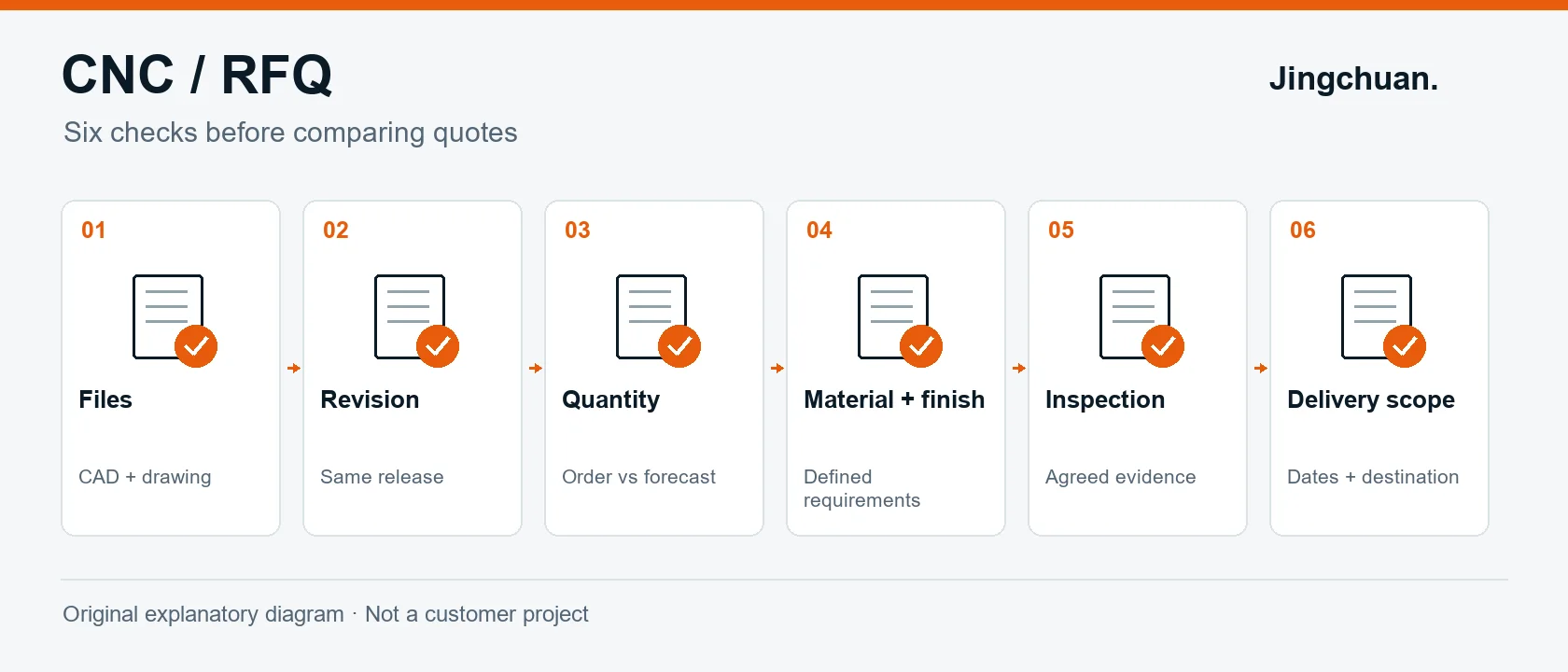
Original explanatory diagram: confirm the six groups of information before comparing offers. This is an illustrative workflow, not a customer case.
1. Package the files and identify the released revision
Send the available 3D model together with a readable drawing when the drawing carries requirements. Autodesk describes drawings as a way to communicate dimensions, tolerances, materials and manufacturing notes alongside the model. A bare model should not be assumed to communicate every acceptance requirement. See Autodesk's explanation of technical drawings.
Use one part number and revision consistently in file names, the drawing title block and the RFQ line item. For example, LAB-PLATE-01_Rev-C.step and LAB-PLATE-01_Rev-C.pdf identify a fictional laboratory fixture plate. Check the actual contents, not just the names. State the units and which document governs if a conflict appears; ask the supplier to flag inconsistencies before work starts. If you have not released the design, label the request as a budget estimate and identify open decisions.
A file manifest can be short: part number, revision, CAD filename, drawing filename and quantity. Keep obsolete files outside the release package. If you need help choosing an exchange format, read our CAD file preparation guide.
2. State quantities as purchasing scenarios
Separate the quantity for the immediate order from possible later demand. Ask for 10, 50 and 100 pieces as separate scenarios if those are genuine purchasing options. Those numbers are examples, not minimum order quantities. Do not describe a forecast of 1,000 pieces per year as a committed order for 1,000 pieces.
For each scenario, specify one delivery or scheduled releases. Ask whether setup, fixtures, inspection and packaging are included or shown separately, and whether any repeat-order assumptions depend on an unchanged design. The Xometry quantity help page illustrates that quantity is a pricing input; its platform rules and prices are not Jingchuan terms.
3. Make a one-page requirements sheet
Use the table below as a pre-send checklist. Fill in the actual project requirements rather than copying generic values.
| Information | What to specify | Clarification to request |
|---|---|---|
| Material | Exact grade, condition and applicable specification, if required | Are substitutions allowed only after written approval? |
| Dimensions | Units, general tolerance reference and specific critical features | Which document and revision will the quotation follow? |
| Threads | Designation, class where applicable, and required depth or through condition | Are any thread requirements unclear? |
| Finish | Process, relevant specification, colour or appearance expectations | Which faces need masking or special handling? |
| Acceptance | Features to report, report format and inspection scope | What is included, optional or excluded? |
| Delivery | Destination, required arrival date and packaging needs | Is the quoted date dispatch or arrival? |
Distinguish functional requirements from preferences. For example, identify the actual cosmetic face instead of writing “perfect surface” for the entire part. If an acceptance dimension applies after finishing, say so explicitly and request confirmation. A photograph may explain appearance, but should not replace defined acceptance criteria.
Technical drawings help communicate a part's geometry and important features; Xometry's drawing guidance provides another manufacturer-side explanation. This checklist does not adopt another supplier's default tolerances or promise a particular machining capability.
4. Agree what evidence comes with the parts
List the records you actually need: for example, material documentation, a dimensional report for identified characteristics, or an agreed first-piece approval step. Ask the supplier to confirm availability and cost. Do not assume every certificate, every dimension or inspection of every part is included in a standard quotation.
For a measurement report, identify the characteristics and the required sampling or coverage, rather than asking only for “QC included.” If approval of an initial piece is a prerequisite for the remaining batch, put that hold point and its effect on the schedule in the RFQ. Review our quality and inspection information when preparing those questions.
5. Compare scope before comparing the total
Copy each supplier's confirmed answer into the same comparison sheet. An unanswered question remains open; do not silently treat it as included.
| Comparison field | Record for each offer |
|---|---|
| Technical basis | Part number, revision and listed exceptions |
| Quantity | Order quantity and release schedule |
| Price breakdown | Unit price, one-time charges and optional services |
| Included work | Material, finishing, inspection and packaging |
| Logistics | Delivery destination and stated shipping scope |
| Timing | Schedule start condition, dispatch/arrival basis and validity period |
Resolve deviations before placing the order. A lower unit price with omitted finishing is a different offer, not automatically a saving. This comparison method is our suggested purchasing workflow; it is not a quotation or a promise of acceptance.
Ready to prepare your RFQ?
For an initial low-volume CNC machining enquiry, gather the current files, immediate quantity and the requirements sheet above. Mark unknown items as questions so they can be reviewed. Then upload your drawings and request a quote. Share the delivery destination and explain whether your requested date is a target or a firm requirement.